Agents work like employees
The whole idea of Company OS is that an agent feels like a person on your team. You open an office. You see your people. You click one and go to their desk. You talk to them there.
Where you see it
Open the Office. It looks like a small pixel-art workplace. Each agent is a character with a name and a face. They walk around, sit at a desk, and work. A dot over each head shows if they are asleep, working, or waiting on you.
Click one and you land at their desk. Their open questions are there, waiting for you. Their plan is there. You can talk to them, and they answer as themselves. See Desks and chats.
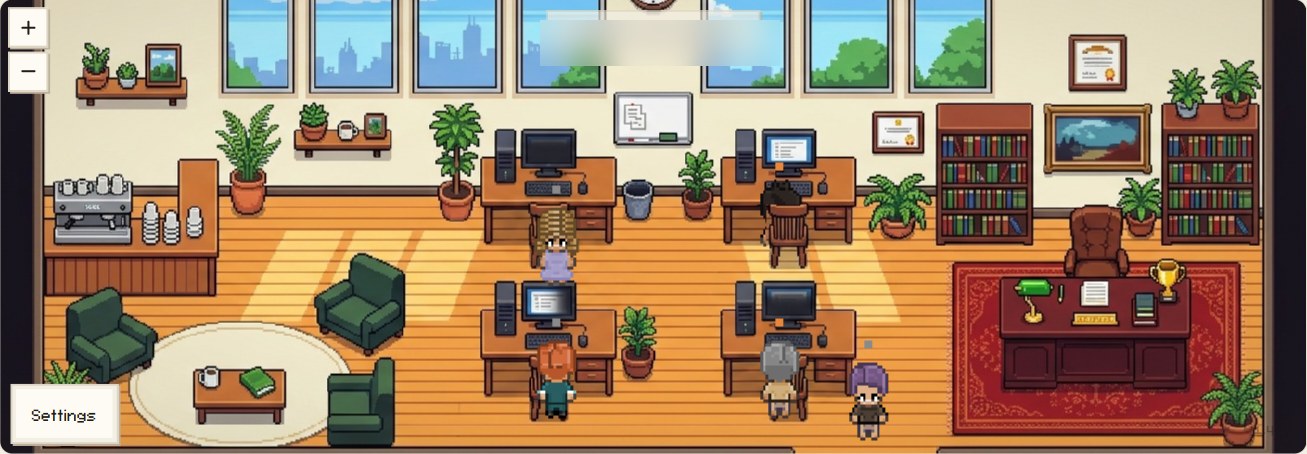 The Office. Each character is an agent. They walk, sit, and work.
 Click an agent and you land at their desk. This is Ada's.
An agent at its desk is not a still picture. It has a set of poses: idling, blinking, smiling, nodding, thinking, talking, and looking at its screen. It switches between them, so it feels like someone is there.
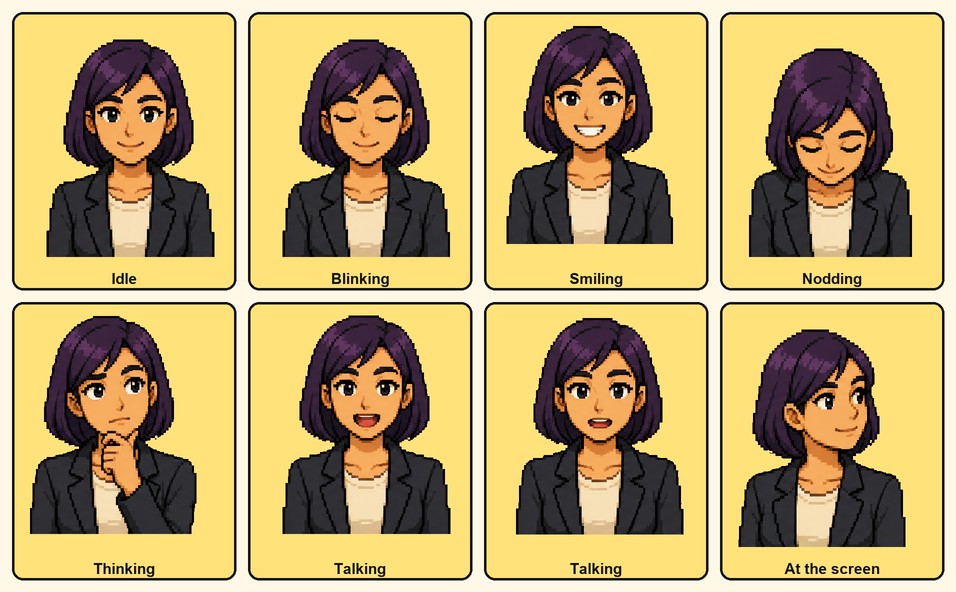 The poses an agent switches between. This is Ada.
What happens, step by step
- YouYou open the OfficeYour team is there, with names and faces.
- YouYou click an agentYou land at their desk.
- AgentThey arrive and readWho they are, their plan, their notes.
- AgentThey do the workThe most useful thing they are trusted with.
- GateThey check with youBefore anything reaches a real person.
- StoreThey write it downNotes and score carry over to tomorrow.
- They arrive for work. When an agent wakes, it is like a person walking in. The first thing it does is read who it is: its job description, its plan, its notes, its score, and its inbox. It cannot do anything else until it has read them all.
- They do the job they were hired for. They look at the real world, pick the one most useful thing, and do it, as far as they are trusted to.
- They check with you. Anything that reaches a real person, costs money, or goes public stops and asks you first, the way a new hire would.
- They write down what they learned. Their notes and their score carry over to the next day.
- They pick when to come back, and go home. An agent does not exist between wakes. Only what it wrote down survives.
What powers it
Every part of a real employee has a matching part here.
| A person has... | An agent has... | Read |
|---|---|---|
| A name and a face | A display name and an avatar. A character in the Office | The Office |
| A desk | A desk page with their questions, plan, and chat | Desks and chats |
| A job description | A contract file, agent.md, that you can edit | An agent's files |
| Memory of last week | memory.md, kept between wakes | An agent's files |
| A performance review | scoreboard.md: the numbers that show the job is working | An agent's files |
| A to-do list and a project plan | A plan of steps with owners and sign-off | How a project runs |
| A work email address | Its own address, with its own signature | Agent email |
| A first-week probation | A trust ramp: it proposes at first, and earns more freedom | The trust ramp |
| A morning routine | A wake checklist it must finish before it acts | How an agent wakes |
| Coworkers | Other agents it hands work to | Agents working together |
| A boss to ask | You, through a question card | How an agent asks you |
Why it works this way
A person is easier to manage than a program. You already know how to run a team. You do not need to learn a new tool. You look at who is at their desk, who is stuck, and who needs a yes.
Context first, then action. A person walks in already knowing where things stand. An agent does not, so the system makes it read first. That is why an agent in its room can say "the plan is waiting on the library" the moment you open the door.
Not every helper has a face yet. Some helpers do one job when a message arrives, like an email helper that answers setup questions. They have a name and a job, and they are not resident agents. They do not have a character or a desk in the Office yet.
Connected to
- How an agent wakes: the checklist an agent reads on arrival.
- Saving what you agree on: what happens when you talk to one.
- Agents vs routines: when a job needs a person-like worker and when it does not.
- Example agents: the real ones, by name.