What's coming next





Company OS is early and changes often. This page shows what we shipped most recently, then what we are working on next. Nothing here has a date. If it is on the list, it is real work we plan to do.
We want Company OS to install cleanly for a new company. Its agents should do real knowledge work well. It should run itself. And it should look good enough that you would show it to someone.
Everything below "Just shipped" is not built yet. The rest of these docs only describe what works today.
Just shipped
A question asked under a finished step stays
An agent that repeats one step for every new lead keeps that step marked done. Its questions under that step used to vanish within 15 minutes. Now the cleanup takes back only a question asked before its step finished. See How an agent asks you.
A changed step asks you again
If an agent changes a step you already approved (its name, its check, who does it, its timing or what it waits on), your approval comes off and the step asks you again, with Approve and No, remove it. A note or a change you make yourself keeps your approval. See Plans and the Roadmap.
Only your tap approves a step
An agent can no longer approve a step for you, even if you say yes in a chat. It may add the step while you talk, and the step's card shows on the open Office within seconds, with Approve and No, remove it. See Plans and the Roadmap.
A changed step list asks about only the change
An agent may now change its own list of steps for a repeating job. When the next round opens, the steps you already approved stay approved, and only a new or changed step comes to you, with Approve and No, remove it. See Plans and the Roadmap.
A new round needs no approval
When a repeating job starts its next round, the steps that come unchanged from the list you approved arrive already approved. Only a step the agent adds or changes asks you again. See Plans and the Roadmap.
A real No for a new plan step
When an agent asks to add a step to its plan, you can now say No, remove it. The step comes off the plan for good, and your note goes to the agent. See Decisions waiting on you.
A notifications switch
Tap the bell at the top of the Office to turn "your answer is ready" notifications on or off for the phone or computer in your hand. See Sign-in and the phone app.
Links and buttons that open the right desk
"Open its room" links and the Manager button now open that agent's desk right in the Office. Tapping a "your answer is ready" notification opens that chat in an Office that is already open. The Health tab shows Check again only on the owner's sign-in, and it comes back if a re-check fails. See The Office and The Health tab.
The fixer fixes, quietly
Otto, the fixer, now puts a proven fix live himself, with no question first and no report after. A checker refuses anything that touches money, logins, sending, or what a routine does, and takes a fix back out on its own if the next run fails. Every fix is one line in his log, so you can ask in a chat what changed. See Otto, the fixer.
One shared set of skills, and contracts that read like a map
The how-tos every agent needs are now kept once, in one shared folder, and every agent uses them. No agent can change them, and the owner can switch one off for one agent with a short line in its contract. Each contract now opens with "Who you are", then reads like a map: its goal, your rules, and "when you need this, open that skill". New agents start this way. See An agent's files and Skills.
The agent wake-up redesign is done
Every part is live. The box reads an agent's files for it when it wakes. Contracts are short, and agents write their own how-to skills (the contract still wins). No wake is set just to look for a reply, and every agent wakes at least once a day. Emails close together are one wake. Agents get better at night, inside Dreaming. Up to three wake at once. And every new agent now starts this way, with nothing to switch on. See How an agent wakes and Building an agent from parts.
What woke an agent
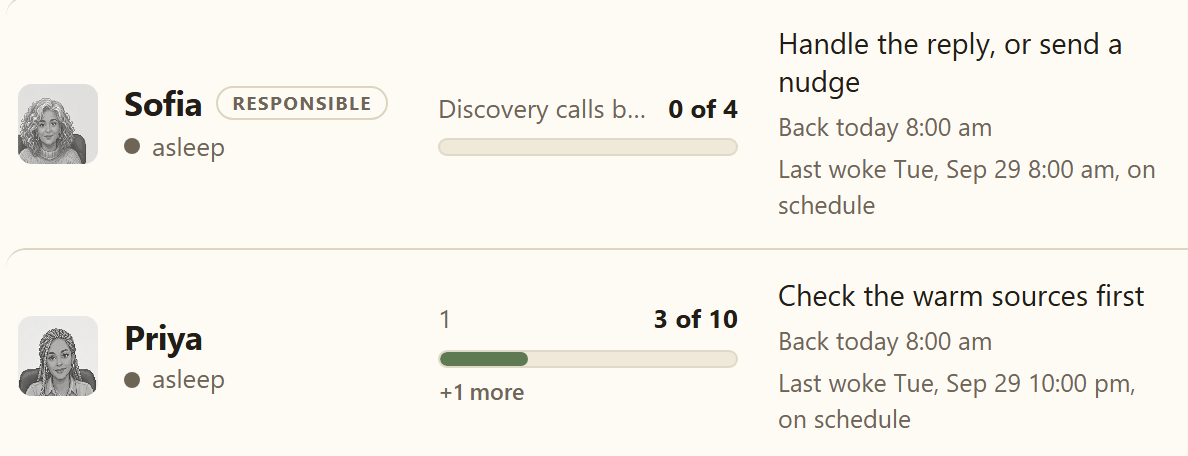
Every wake now shows why it happened, in plain words on the agent's row. "Woke because someone emailed" is never mistaken for "woke on schedule."
Wake time in a chat
Ask an agent to pick something up later, right inside a chat, and it can set its own wake time for it.
Rounds for repeating work
A job that repeats, like a monthly workshop, now runs in rounds. Each round has its own steps, and the next one starts when the last one is done.
A usage meter in the Office

Two small bars at the top of the Office show how much of your Claude plan you have used, so a busy week does not surprise you.
A Daily checkup that checks its own list
If its list of checks ever falls out of step with what the system really does, the checkup now says so.
A Roadmap on each desk
Open any agent's desk and see its plan as a full sheet, with a button to approve it.
Agents that work better
The wake-up redesign is done (see Just shipped). Next, a second pair of eyes on what agents write.
A reviewer agent
A second agent will read an agent's writing before it goes out. Once that works, agents can send more on their own without waiting for your yes each time.
Installing it for your company
Today we set Company OS up by hand. These items make the install repeatable, so your company gets its own clean copy.
A setup kit
Everything specific to one company, like names, email addresses and accounts, moves into one settings file. A new install starts from that file, not from a copy of someone else's box. That makes a second install much easier.
Onboarding questions and filing rules
Both are written. A set of questions learns how your business works, and a set of filing rules decides where each thing you tell it belongs. Neither has been used on a real client yet, so that is the next step.
Your own documents
During install week, you hand over your how-tos and policies, so your agents can work from your own procedures.
What you get to read
A one-page guide
The docs cover a lot, and it is spread over many pages. You will get one plain page called "How to use your system."
A monthly report
Once a month, a short note on what your system did for you.
The Office
Connected to
- What is Company OS: the whole idea, on one page.
- How an agent wakes: how wakes work today.
- The Office: the screen most of this shows up on.